Birthday Girl...Joo Sing In Da House!!

0 comments
Quah Joo SingYo Joo Sing, Happy Birthday to you !!
I pray that your cupcakes biz will expand and have more biz.
Keep up your good work and always trust in the LORD.


P.S: If you guys want to order cupcakes, checks out this site. Cupcakes4You.blogspot.com. Btw, if you guys don't stay in Penang, too bad. Mayb next time she will have outstations or overseas delivery. Who knows..=)


See Ya & God Bless !!

- Ben The Drummer
[ Continue Reading... ]
Birthday Girl...Joo Sing In Da House!!SocialTwist Tell-a-Friend

I'm Back from Hillsong United Live Concert in Malaysia 2008

3 comments
Hi guys, sorry for the late update on Hillsong United's Live concert. Was quite busy this few days.

Firstly in the morning, quite a lot of things happened. Was supposed to help Darren fetch some people to Hunza, manatau the car can't start. Just because my mom didn't change the gear back to "P" when she parked, and I didn't noticed. Then I had to use my own car. Low and behold - my car door wasn't locked and it was outside. So after going in the car, I noticed my car was ransacked ler. Happens that the previous day one of my neighbour was almost robbed by two guys on a motorbike and during the morning, another neighbour was also almost robbed. So conclussion - the two guys might have broke into my car.

We left Hunza at around 7.30am and we stopped at a few stops. We reached PJ around 12.30pm, then we went to 1-Utama for lunch and some shopping. Didn't bought anything except eating la. Actually during the journey, we were just eating, watching movie and talking in the bus. =)

Here are some photos:

Ben The Drummer in Dunkin Donuts ShopPosing in Dunkin Donuts

Vietnamese RestaurantLunch at some Vietnamese Restaurant


After hanging out at 1-Utama, we left there at 4.15pm then we left for Glad Tidings Church PJ. We reached there at 4.45pm!! So early... and the concert starts at 8pm. We reached there so early because we thought the traffic will be very heavy around after works time. Ended up there wasn't any traffic jam.

We had to wait there around 2hours before we lined up to go in and we had a huge crowd. While waiting, some of us eat again, some talking and some resting and having a nap. During that time, we could also hear them practising. =)

Ben The Drummer & friends at Hillsong United Live ConcertA small group of us posing

Group Picture at Hillsong United Live Concert
Having group photo

Hillsong United Live Concert crowdThe crowd waiting to go in


After waiting for so long, we got to go in to the auditorium and it was huge!! Soon, they started with their trademark opening. It was amazing!! Everyone was jumping and raising their hand.

After the praise songs, Joel Houston started to talked, and he said: they (Hillsong band) is not here to only put on a show or a concert but they are here to reach out and spread the word. And they were here to have praise & worship together with us.

Then they started the first worship song. I forgotten what was the song, but what I remembered was tears kept running and the Love of GOD was so wonderful.

Hillsong United Live ConcertYeah..concert time !!


Hosanna - this isn't Brooke Fraser. She wasn't there. =)


For more pictures, go over to Melvin's Photo Album.

After the concert, we then went to wash our face and change clothes because we were all sweating. Then, we went to the bus and the journey back to Penang started again.

This time, the bus driver was speeding back to Penang while we were sleeping. The bus was shaking quite heavily but most of the people in the bus was sleeping like a pig. hehehe

We reached back to Penang around 5.00am. It only took us 4 1/2 hours to reached back to Penang compared to the 5 1/2 hours going there. LoL

So thats all I have to say for the one day trip. Btw, sorry for the long post. =)


P.S: If you have anything to add in, just leave your Comments.


See Ya & God Bless !!

- Ben The Drummer

[ Continue Reading... ]
I'm Back from Hillsong United Live Concert in Malaysia 2008SocialTwist Tell-a-Friend

Hillsong United Live in Malaysia 2008

0 comments
Hillsong United Live in Malaysia 2008
Hillsong concert here I come!! woohooo........


Hillsong United Live in Malaysia 2008 ticket
I'm really looking forward to this concert and it's Tomorrow...28 May!!!

Tomorrow, a group of 30 over people from Ignite-Youth will be traveling down to Petaling Jaya by bus. We are going to meet at Hunza at 7am in the morning and will be leaving at 7.30am. It is going to be like a 5hours plus journey... depending how fast the driver drives and how often we stop.

After reaching PJ, most probably we will be hanging out in 1U (1 Utama) first then only go over to Glad Tidings Church for the concert.

The concert is starting at 8pm but we have to be there early because it's gonna be very pack. As usual also la the traffic is also gonna be jammed.

After the concert, we will we traveling back to Penang. Another 5hours plus journey. So, tomorrow its gonna be a very tiring day but its A Power Pack day!!!

Hillsong United is gonna ROCK your world

I have a video here for you... enjoy watching...


So, for those that is going, lets rock on and enjoy ourself. But for those that are not going, don't worry because this will not be the last time they will be coming. Maybe God will bless you with a ticket to their Live concert in Australia. That will be even greater right?! So chill........

I will have some pictures uploaded after the concert on the following post. Hopefully can have some videos to. =)


See Ya & God Bless !!

- Ben The Drummer
[ Continue Reading... ]
Hillsong United Live in Malaysia 2008SocialTwist Tell-a-Friend

Birthday Uncle William In Da House!!

0 comments
William Tan Chee SengHappy belated 3(?) Birthday to the Ignite-Youth's uncle !!

I don't think he will be reading this. =)

Now he's enjoying himself in Taiwan having his holidays.

All the best in all your undertaking and God Bless!!


See Ya & God Bless !!

- Ben The Drummer
[ Continue Reading... ]
Birthday Uncle William In Da House!!SocialTwist Tell-a-Friend

Andy Mckee - Guitar - Drifting

0 comments
Check out this video clip. Amazing style of guitar playing and very unique.

Enjoy watching !!


See Ya & God Bless !!

- Ben The Drummer
[ Continue Reading... ]
Andy Mckee - Guitar - DriftingSocialTwist Tell-a-Friend

Alternative for Microsoft Reader - Free Download

2 comments
If you're looking for an Alternative for Microsoft Reader or Microsoft Reader Alternative, you've come the the right place.

OK OK... now I'll tell you what's the Alternative for Microsoft Reader.

The Alternative for Microsoft Reader is.................................

-

-

-

-

it's ICE Book Reader Professional.


To read more about this software, please go over HERE.

If you have problems opening/reading a .lit or a .rar file, read this post - My Reply To Carmen - Reading a .lit file.


P.S: Hope this post helped to solve your problem in finding for an Alternative for Microsoft Reader and with Zip files and .lit files. =)

P.P.S: If what I shared with you was helpful and helped solve your problem, I would really appreciate for a small donation. Thanks =)


[ Continue Reading... ]
Alternative for Microsoft Reader - Free DownloadSocialTwist Tell-a-Friend

How To Open A .Lit File

0 comments
*Updates: Alternative for Microsoft Reader (Read Here)

Referring to your question:
Carmen's QuestionQuestion 1:

Before this, I have not come across any .lit files or extensions before, but after I "Googled" around, I came to know what is it all about. By the way, thanks for bringing this up. =)

So basically, the file that you received is obviously a .lit file. You will need to download Microsoft Reader. Download the file to My Documents or somewhere else, then open the reader and select your book.


Download Microsoft Reader


IMPORTANT DOWNLOAD INSTRUCTIONS


1) Click the download link.


2) In the File Download box, select Save this program to disk.


3) Save the file named "msreadersetup.exe" to your hard drive.


4) When the download is completed, locate msreadersetup.exe on your hard drive and double-click the file to begin installation.

Note:
If you are running Internet Explorer 5.0 or later, a dialog box will appear when the download is completed, and you will be prompted to begin installation.


5) You'll be prompted to activate your copy of Microsoft Reader. This important step is required to purchase premium eBook titles that have been encrypted for distribution through the activation process.

Note:
If you currently have an activated version of Microsoft Reader 1.5 or 1.51 on your laptop or desktop computer, make sure that you use the same Passport or Hotmail account to re-activate the new version after downloading it. (You must use the same account information to open and read the Owner Exclusive content that you have already purchased.)


6) When installation is complete, you may be prompted to restart your PC. After the restart, the installation will continue. We strongly recommend activating your device at time of installation so you can purchase and open the Owner Exclusive premium content you may already have.


Go over here to learn more on E-Book formats and readers to use.


Question 2:


I think you mean a .rar format is referring to a file being compressed or zipped. The file holds 1 or more files in it. I'm not sure is this what you're asking for. =)


The most common softwares to use are WinZip 7-Zip or WinRAR. Just choose one.


Download WinRAR (1.15 MB)


For me, I only have experience using WinRAR.


Here is some tutorial how to unzip the file:


WinRAR TutorialIf you still have problem using either of the unzipping software, just go and Google it up.


The software to read a .PDF is Foxit PDF Reader or Adobe Acrobat Reader. You can read my previous recommendation on PDF Readers.


P.S: To Carmen - if I didn't answered your question just let me know in the Comments box. So if it was what you're asking for and it solve your problem, just write me a testimonial Comment. =)


P.P.S: If I missed something in this post, feel free to add them in the Comment box. Thanks a lot.


See Ya & God Bless !!


- Ben The Drummer

[ Continue Reading... ]
How To Open A .Lit FileSocialTwist Tell-a-Friend

Sandboxie...The Sandbox On Your Computer

0 comments
*This will be quite a long post, but it's worth reading if you want to have a better security system for your computer. Enjoy reading !!

SandboxieHave you ever installed a program, then suddenly wished you hadn’t? Some programs screw up your settings and you have to reset them again. Will you be happy with it? - No I wouldn't be!

Are you tired of dealing with rogue software, spyware and malware? or tired of spending countless hours removing unsolicited software? Fear not because Sandboxie is here for the rescue!

Description: Sandboxie is a program that can create a 'Sandboxed' environment on your PC within - which you can install and/or run programs or browse the net. Any data writing operations that the Sandboxed applications perform can then be rolled back and/or eliminated.

The net effect of this is to create a kind of undo mechanism that can be used to test out programs without damaging the system or surf the web without risk of infecting the system with any kind of malware.

The Sandbox defined: a Sandbox is a virtual environment that captures all disk-writing operations. For example, if you run your browser through Sandboxie and surf the net, all of the cookies, cached files, and downloaded files (including any malware that may sneak in), or even any entries written to the registry will actually be made within the Sandbox. Note that these files will also appear in your file system as well (for example, if you download a zip file to the desktop during a Sandboxed browser session it will appear on the desktop where you normally would expect it). However, in fact this zip file is only there virtually, and once you shut Sandboxie down (or empty the contents of the Sandbox) the file will no longer show on the desktop.

How To Use Sandboxie?
1) After installing Sandboxie, go to your start menu, then find for the Sandboxie program. Later on click on 'Sandboxie Control'. The program will then run on your system tray. The logo is like this:
2) Go to he system tray and right-click on it.
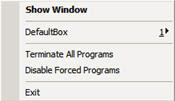


This will show up. Then go to 'DefaultBox'.


Then.... this menu bar will show up.
- Click 'Run Web Browser' and it'll launch your default web browser.
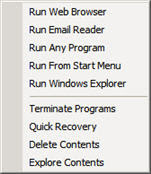
- Click 'Run Email Reader' and it will launch either Outlook Express or Thunderbird or any other email programs that you use.

- Click 'Run Any Program' and you can choose what program you want to run on Sandboxie.

- Click 'Run From Start Menu' and you can run any program from inside your Start Menu.

- Click 'Run Windows Explorer' and your windows explorer will run. (Btw, not Internet Explorer ok) It's your My Documents or My Computer... you got it? Great

So after using Sandboxie, you have to click on 'Terminate Programs'... but you have to always remember to Recover the things that you want before Deleting the contents!! (Take Note).

If you still don't know how to use Sandboxie, just GOOGLE it up or you can just ask me.

You can download the trial version for 30Days. After the trial period, a pop-up box will always remind you that your trial period for 30Days are over. So just wait for 5seconds and you are good to go again. =)

*It's only 0.96MB, so don't worry about it taking up a big junk of your memory space.

Download Sandboxie Now


Have you downloaded Sandboxie yet? If yes, you can now go and uninstall all your anti-virus, anti-spyware and or of those software!! LoL

Hey, I'm just joking ok. You'll will still need those softwares for security purposes.


P.S: Hope this software recommendation from me will help you experience a better and tighter security for your computer and save you some money on repairs?

P.P.S: If this software helped you out a lot, in return, I'll appreciate if could write me a Comment or Testimonial. =)


See Ya & God Bless !!

- Ben The Drummer

[ Continue Reading... ]
Sandboxie...The Sandbox On Your ComputerSocialTwist Tell-a-Friend

Foo Fighters vs. Guns´N´Roses

0 comments
Check out this video clip... LoL

Some may like it and some may not. =)

Enjoy watching!!


P.S: If you have any Comment for this video clip just leave them at the Comment box.


See Ya & God Bless !!

- Ben The Drummer
[ Continue Reading... ]
Foo Fighters vs. Guns´N´RosesSocialTwist Tell-a-Friend

Foxit PDF Reader Alternative To Adobe Acrobat Reader

1 comments
Foxit PDF ReaderAt some point, we've sure stumbled across a .PDF (Portable Document File) on the Internet or from anywhere else for our work or assignments and most of us will use Adobe Acrobat Reader to read this files.

As for me, you too are tired of Adobe Acrobat Reader taking up almost 23 MB of disc space, always asking for updates and not providing the swift performance?

I would like to introduce to you - Foxit PDF Reader, a product from foxitsoftware.com.

What I like about Foxit PDF Reader is that the download size is only 2.55 MB which is a fraction of Adobe Acrobat Reader 23 MB size. It's breezing-fast when comes to launching the software without any delay. You are not forced to an annoying splash window displaying the company logo, author names, etc.

Benefits:
  • Supports all the standard documents.
  • Create snapshots from a selected portion of the page.
  • Fill interactive form.
  • Import/Export forms.
  • Save the PDF forms you fill out.
  • Easily adding bookmarks (providing the PDF's security settings allow it).
  • Draw graphics.
  • Highlight Texts.
  • Build-in Tabs to view multiple PDFs.
  • Type text and make notes on a PDF document and then print out or save the annotated document.
  • Text converter: You may convert the whole PDF document into a simple text file.
  • High security and privacy: Foxit Reader highly respects the security and privacy of users and will never connect to the Internet without users' permission while other PDF readers often silently connect.
The new Version 2.3 build 2825 now even supports many media formats including audio and video.

What are you waiting for?? Download Foxit PDF Reader


P.S:
Hope you make a smart choice and switch to Foxit PDF Reader rather then the bulky Adobe Acrobat Reader. =)

P.P.S: If this recommendation was usefull to you, I would appreciate it if you could leave me a Comment.


See Ya & God Bless !!

- Ben The Drummer
[ Continue Reading... ]
Foxit PDF Reader Alternative To Adobe Acrobat ReaderSocialTwist Tell-a-Friend

Busy Playing Schedule

2 comments
Have been playing drums for church services more often compared to the previous years. Almost every week sure have people ask me to take over this service or that. Tired one you know. haha

As I was typing away, I just received a sms for the songs for this coming Tuesday Bible Study. Great... here goes again, but after this Tuesday then won't be playing till next Saturday. At least get to rest. Don't tell me along the week comes another person asking me to take their place. LoL

What to do, I still enjoy playing. =)

Just tuned my snare drum during yesterdays morning practice and I still can't get it to the sound I like. Damn it !! Hopefully can tune it back to my preferred sound soon.

I feel that for me, I'll play better when my snare is in tune. I don't know why, but thats me ok. I don't think it applies to any other drummers. What I can say is drummers will always enjoy playing a well tuned drum. What say you??

OK... here some snapshots of my previous months playing schedule:
- Dark Green is playing
- Light Green is practices

My CalendarMarch 2008


My CalendarApril 2008


My CalendarMay 2008


I know some of you also know how it feels serving almost every week. I call this - playing the MARATHON.

I'm not sure you guys remembered me mentioning there is one time I had to play for 8 Sunday services straight. You can read it again HERE. =)

Thats all I have to say for now and Happy Mothers Day !!!


P.S:
Just shoot me some Comments if you have something to say.


See Ya & God Bless

- Ben The Drummer
[ Continue Reading... ]
Busy Playing ScheduleSocialTwist Tell-a-Friend

Birthday Girl Alvina In Da House!!

3 comments
Alvina Tan
Hey, Happy Birthday to you !!
Today is your birthday, but tomorrow is only your birthday... LoL
Don't forget that you're in America and I'm not.

How long already ar didn't see you already?? I think around 5years??
When you only want to come back huh?? haha

After becoming a famous world class musician must remember me yea ! haha

Enjoy yourself there and all the best in your undertakings.

God Bless you & take care !!


P.S: By the way, she's my sister. =)


See Ya & God Bless !!

- Ben The Drummer

[ Continue Reading... ]
Birthday Girl Alvina In Da House!!SocialTwist Tell-a-Friend

Blogging Sites

0 comments
Here is a short list of some good blogging sites.

1) Blogger/Blogspot
https://www.blogger.com

2) Wordpress
http://wordpress.com or http://wordpress.org

3) Xanga
http://www.xanga.com

4) Weebly
http://www.weebly.com

5) TypePad
http://www.typepad.com

6) Google Page Creator
http://www.pages.google.com


For those that already have their blog up and running can just continue to use them, unless you want to register for any of the rest to play around.=)

For those that still do not have a blog but wants to start blogging, you can go around testing which one suites you the most. But what I suggest for beginners to use is Blogger, because it's very easy to use.

But for those that likes to customize their blog to their own liking, go ahead and try Weebly. You will be amaze how far you can go to create the blog to your own likings. In the beginning it will be a little complicated, but after playing around for a while, you'll get used to it.

Wordpress is also very good, but be prepared for the more complicated set-up. =)

For Xanga, I've never tried it before so nothing much to say about it. But if you have any experience using Xanga, feel free to leave your comments about it.

For TypePad, you have to pay for it, so it's out for me. Hehe... but they offer a 14 days trial, why not just get the trial and play around with it. =)

Google Page Creator is part of Google's services. So you just need to have a account with Google then you can start using it. I haven't really played around with it yet, so not much to say.


P.S: Hope you learned something here. Pour in your comments if you have any. =)


See Ya & God Bless !!

- Ben The Drummer
[ Continue Reading... ]
Blogging SitesSocialTwist Tell-a-Friend

Beginners Guide to Blogging

0 comments
BloggingHi guys, today I'm going to talk about blogging.

Basically a blog is like an online journal. You can digitally record down your ideas, thoughts, opinions or anything for people to read.

Blogs come in different styles, formats, and settings, depending on the preference of the user. Many blogging sites, offer built in features such as hyperlink, straight texts, pictures etc. Some blogging sites, even allow you to put video and mp3's on your blogs.

Instead of writing texts, some bloggers choose to make their blogs more audio friendly, by using spoken word entries. This is called audio blogging or podcasting.

Basically a blog contains these features:

Title- the name of your post/article.
Body- this is the content of your post.
Trackback- links from other sites to your blog.
Permalink- the URL for your that particular post/article.
Comments- for readers to post their opinions/comments on your blog.

Bloggers that use any of the blogging sites has an advantage, because it's made up of only a few templates. Unlike, other websites that is made up of numerous individual pages. This make it easier for blog users to create new pages, because it already has a fix setting that include: slots for title, body of the post, category, etc.

This is very useful for new blogger and they can start blogging right away. They just have to choose a template provided by the blogging site... and Wahla... you can start blogging.

Blogging is not just limited to personal usage. There are a lot of blogs that follow a theme such as: sports, politics, music, etc. This way blogging becomes a medium in which people can share their knowledge and opinions about a variety of themes and topics.

Some bloggers even use their blogs to advertise. Some authors advertise their books on their blogs. While other bloggers, use their blogs to shed light to currents issues, events and news.

Nowadays Professors are also using blogs to document the lessons that they have discussed and taught in class. This way, students who who have missed classes, can easily catch up with their assignments.

The most popular blog type is the one that takes the form of a personal journal. This is the kind that is usually used by first time bloggers. To express themselves, they use blogging to document their daily struggles in lives, poems, rants, opinions, etc.

Bloggers usually communicate within themselves. This is one of the appeals of blogging. It creates a community of people sharing their ideas, thoughts, and comments with each other.

Blogging is popular all over the world and it's a short term for weblog.

There are plenty of famous blogging sites to choose from,such as: Blogger/Blogspot and Wordpress.


P.S: I hope you learned something from here


See Ya & God Bless !!

- Ben The Drummer

[ Continue Reading... ]
Beginners Guide to BloggingSocialTwist Tell-a-Friend

Movie Review...Iron Man

1 comments
Iron Man the Movie
Last night I went to watch Iron Man with a group of my friends and I enjoyed it.

Overall the movie is OK, but the fighting part is too short... hehe.

The part where Tony Stark (Robert Downey Jr.) was building his Iron Man suite in the mountain when he was kept hostage was interesting.

His house was like... oh my gosh... so nice... His house is build on a hill all by itself and his cars - Rolls-Royce Phantom and Audi R8.

The part when he was designing his new suite was nice. That part where he took the parts of the design on the hologram and throwing the part that he don't like into the rubbish bin... LOL

Anyway I do not want to spoil the whole movie for those that have not watched it yet =).

The synopsis for Iron Man is over HERE. ( Warning! This synopsis contains spoilers )

Here are some pictures

Iron Man
Iron Man
Iron Man
I hope I didn't spoil your movie... =p


See Ya & God Bless !!

- Ben The Drummer
[ Continue Reading... ]
Movie Review...Iron ManSocialTwist Tell-a-Friend

PicLens...Experience Full Screen Web Photo & Video Browsing

0 comments
Picture-in-picture browsing. Sweet!

PicLens
PicLens is the web's premier media browsing experience. Install it on your browser to enjoy online media in full-screen, 3D.

Here is a short video explaning to you what you can do with PicLens. Enjoy watching...


PicLens.com

There are more explanations and tutorials HERE.

To check out their blog, click HERE.


Download PicLens Now


P.S: Hope you guys liked this recommendation from me. You can write me some Comments what you think about PicLens. =)


See Ya & God Bless !!


- Ben The Drummer

[ Continue Reading... ]
PicLens...Experience Full Screen Web Photo & Video BrowsingSocialTwist Tell-a-Friend

Sketchcast...A New Way to Express Yourself

0 comments
I just came across this website called Sketchcast a few weeks ago, but I didn't have the chance to play around with it.

You guys will like this one !

So... what can u do with Sketchcast or What's Sketchcasting?

1. Record a sketch with or without a voice. Explain something, have fun, or create art.

2. You can then embed the sketch player in your blog or point people to your sketch channel.


Here is a video to give you a better explanation of Sketchcasting. Enjoy watching...


Sketchcast.com


Hope you guys liked this recommendation from me.

P.S: Why not you guys go try it out and create yourself a sketchcast. Then share it with us. Cool??


Related Post: Sketchfu... Alternative for Sketchcast
[ Continue Reading... ]
Sketchcast...A New Way to Express YourselfSocialTwist Tell-a-Friend
 

Copyright © Ben The Drummer's Personal Blog. All rights reserved.