There are lots of people who are always confused on what is PC Hibernate and PC Sleep Mode and its features. Today you'll understand what PC Hibernate & PC Sleep Mode can do for you.
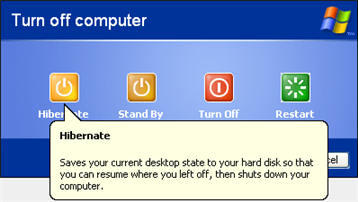 What is PC Hibernation?
Computer hibernation is the process in which your computer stores all contents of your RAM to your hard disk, which will save the content of your desktop & keep some programs that are running up until you boot up your computer. This can be done by saving it to a file or saving it to another hard drive partition. Hibernating is a great way to quickly boot up your computer to the previous state in which you left it.
How to Hibernate your PCIn order to hibernate your PC, first you've to enable hibernation. Right-click on your desktop and click on properties to get to display properties. Click on Screen Saver and then on Power near the bottom of the box. Next, go to the Hibernate tab and then click ‘Enable Hibernation’. Then click the ‘Start’ button, ‘Turn off computer’, then hold down the "shift" key on your keyboard and the Stand By button should switch to Hibernate. Click on that and then your computer will go into hibernation mode. To start it up again, you'll just need to push the power button on your computer. It's that simple
 Then, What is PC Sleep Mode?
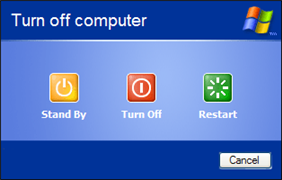
The computer Sleep Mode was once known as Stand By or Suspend mode, in which it saves energy but doesn’t quite turn the PC off. In Sleep mode, Windows saves what you’re doing and then puts the computer to sleep — a special low-power mode. The computer isn’t exactly off, and it restores itself quickly, which makes Sleep mode more effective as a way to shut down the computer.
How to Use Your PC’s Sleep ModeClick the ‘Start’ button, ‘Turn off computer’, then click Stand By button to get your PC to Sleep Mode.
So What’s Actually the Difference between PC Hibernate & Sleep Mode?The
Main difference is that Hibernate is a
Better way of Powering Down you PC or laptop. Since your
data is saved to your hard disk and not RAM. This makes it a safer, but slower option for shut down and resume. By hibernating your computer, you also save up on your battery life because you don't have to close all the programs nor restart the computer.
The
Huge drawback to Stand By is you run the possibility of losing whatever data you were working on if the power goes out. So, as a precaution, you might want to save the data before putting your computer in this mode... if not use
Hibernate.
The winner between the two is — to set your computer to Hibernate Mode!!!


